Contact Us

If you still have questions or prefer to get help directly from an agent, please submit a request.
We’ll get back to you as soon as possible.

Please fill out the contact form below and we will reply as soon as possible.

  • Knowledge Base MINI
  • Contact us
English (US)
US English (US)
DE German
  • Home
  • Working with orderbird PRO
  • Working
  • Restore and manage guest receipts: Payments

How do I reopen a receipt?

Written by Jens B.

Updated at February 19th, 2025

Contact Us

If you still have questions or prefer to get help directly from an agent, please submit a request.
We’ll get back to you as soon as possible.

Please fill out the contact form below and we will reply as soon as possible.

  • First Steps
    Hello new Bird! About your Apple devices Step 1: How to set up your network Step 2: MY orderbird Step 3: How to install and set up the app Step 4 - How to serve your first guest Step 5 - Card payment with orderbird PRO
  • Working with orderbird PRO
    Working Settings Fiscalization in Austria (RKSV) "Kassensicherungsverordnung" in Germany orderbird PRO - Versions and Updates
  • Card payment
    Your start with card payment with orderbird PRO and Worldline Your start with card payment with orderbird PRO and Nexi Germany Your start with American Express Working with orderbird card payment Pay Terminal Plus (WiFi card reader) Pay Terminal One (Bluetooth card reader) Card payment on the smartphone
  • Analyze your sales
    Reports on orderbird PRO The DATEV export Reports on MY orderbird
  • Printer & Network
    Printer Network
  • Expand your orderbird PRO
    orderbird PRO Cashbook orderbird Gift Cards Bestellmanagement
  • MY orderbird - Your orderbird business account
    Your account settings on MY orderbird
+ More

Table of Contents

In a nutshell Let's go Sorting No reopening of receipts from colleagues Attention when paying by card Any questions? Do I also have to reopen the receipt if the customer requests an expense receipt?

On your way to the customer, you notice that the €34.99-menu is missing from the receipt. Or the customer waves a voucher that they want to redeem quickly after you have printed the receipt?

Besides the fact that you have to make an extra detour to pick up the correct receipt, this is not a problem: you can reopen receipts/tables from the current shift in orderbird PRO as often as you like.


In a nutshell

  • Please only reopen receipts that you have settled yourself. Hands off your colleagues' receipts!
  • Tap on "Payments" and select the receipt that has incorrectly been invoiced
  • Then tap on the action button in the top right corner and reopen the receipt
  • Charge again the table properly

Let's go 

First things first:

  • You can only reopen receipts during an ongoing shift. Once a shift has been closed, the receipt is permanently fixed and cannot be settled or adjusted again.
  • Please only reopen your own receipts, not those of your colleagues. In exceptional cases, you can also restore your colleagues' receipts, but you will have to do some manual calculations afterward.
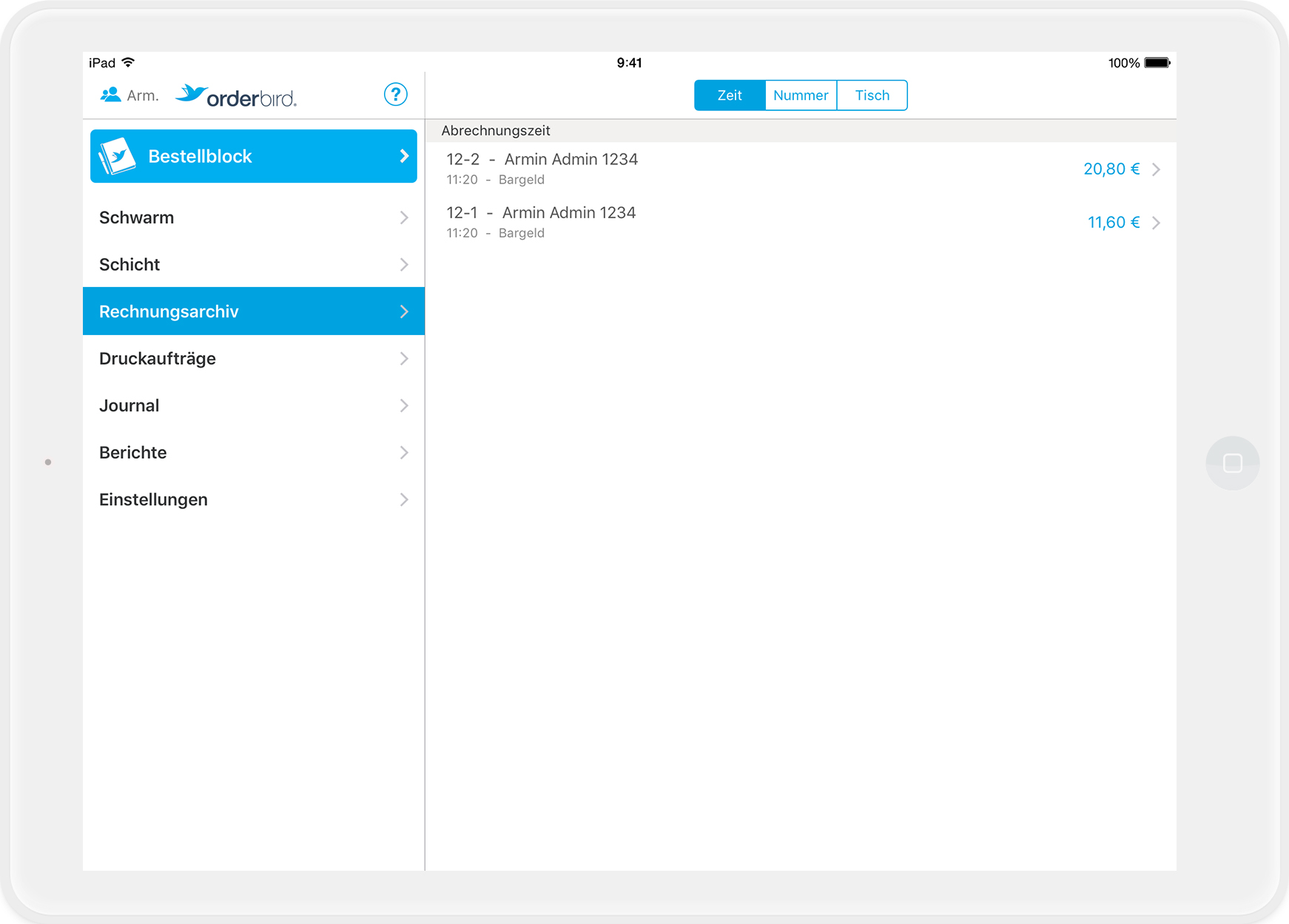
  1. Tap on "Payments" in the main menu of orderbird app, and you will find all the closed receipts on the right-hand side.
    Sorting

    You can sort out the receipts at the top of the tab on the right-hand side either by the time the receipt issued, by receipt number or by table.

     
  2. Chose the receipt that you'd like to reopen.

    No reopening of receipts from colleagues

    Make sure that the person who billed the receipt is also the same person who is logged in as user! If not, you can tap on the staff symbol with the blue figure in the top left corner to select the right user.

     
  3. Tap on the action button and select the option "Reopen".
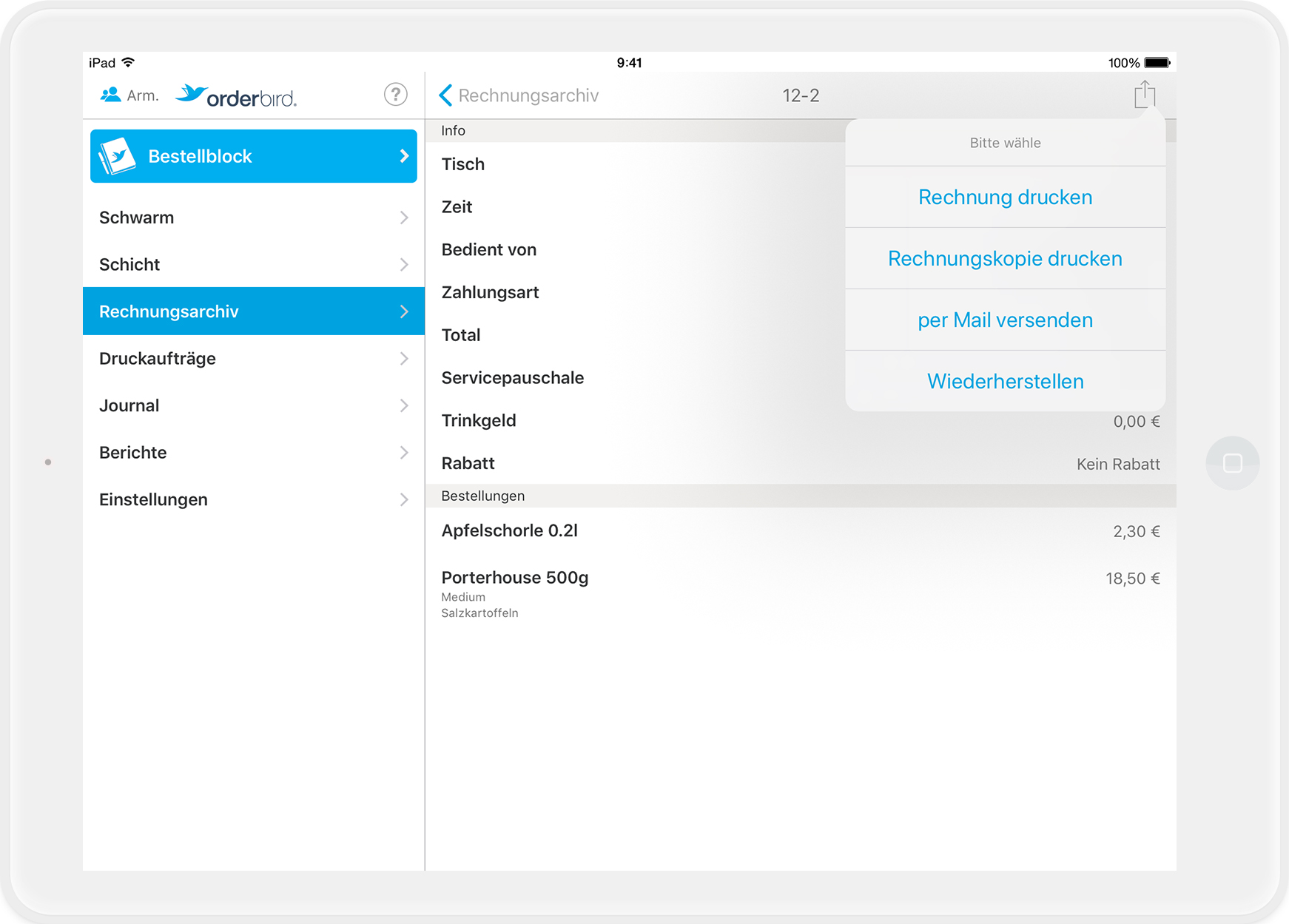
  4. Please confirm in the next window that you wish to recover the table. If you now go back to the orderpad, you will find the recovered table in the floor plan!
  5. Now you can add or cancel items to this table and/or change the payment method.

    Attention when paying by card 

    Important: If you reopen a receipt that was paid by card, the money will be automatically refunded to the cardholder. Please be sure to charge the receipt again, if necessary, with the same card or another payment method.

     
  6. Done! 

Any questions?

Do I also have to reopen the receipt if the customer requests an expense receipt?

No! Simply go to the payment archive and tap on the action button in the right-hand corner. Then select "print invoice" and you will automatically get the receipt including the expense receipt! Please don't forget to destroy the previous receipt, as you have just printed a second original receipt. And originals can only exist once.

invoice recover

Was this article helpful?

Yes
No
Give feedback about this article

Related Articles

030 208 983 098

About orderbird

With over 17,000 customers — restaurants, cafés, bars, clubs, and beer gardens — orderbird is one of the leading Point of Sales systems for the hospitality industry in Europe. With the mobile POS system orderbird MINI, orderbird also offers a smart cash register solution for service providers, retailers, mobile hospitality, and the crafts.

orderbird was founded in 2011 and today employs more than 120 people.

Address

orderbird GmbH
Ritterstraße 12
D-10969 Berlin
Phone: 030 208 983 098

Opening hours

Monday: 09:00 - 18:00
Tuesday: 09:00 - 18:00
Wednesday: 09:00 - 18:00
Thursday: 09:00 - 18:00
Friday: 09:00 - 18:00
Saturday: Closed (except emergency support)
Sunday: Closed (except for emergency support)


© 2026 orderbird GmbH
  • Imprint
  • Privacy Policy
  • Legal Notice
Expand